 跳到内容

When a commercial lighting project mentions DALI+, buyers can easily confuse it with DALI-2, a wireless gateway or a general “smart lighting” label. Those distinctions matter. A luminaire ordered with a DALI-2 driver is not automatically a native DALI+ wireless device, and a controls proposal that uses wireless gateways is not the same architecture as DALI commands carried over a wireless or IP-based medium.
This article is a practical procurement checklist for fixture buyers, OEM teams and project managers. It explains what to confirm before adding “DALI+ ready” to a product schedule. Standards and certification programmes evolve, so verify the current status in the DALI Alliance’s DALI+ overview and the exact device entries before placing an order.
The featured technician image is a concept illustration, not a photograph of an LCB installation.
First, distinguish the terms
DALI-2 is the current version of the established DALI lighting-control protocol for wired systems. According to the DALI Alliance FAQ, DALI-2 adds features and includes control devices such as application controllers and sensors, with a focus on multi-vendor interoperability. DALI+ carries existing DALI commands over wireless and/or IP-based networking instead of only the dedicated wired pair used by typical DALI-2 systems. It is not a completely unrelated lighting language.
As of October 2026, the Alliance says the first DALI+ certification programme is being developed for DALI+ with Thread. Its public overview describes certification tests as in development and notes that the supporting specification will be updated before certification starts. Therefore a buyer should not assume that every product marketed as “DALI+ compatible” already has a DALI+ certificate. Ask for the exact certification status and check the relevant product database at the time of purchase.
D4i is another related term. It extends specified data and power-supply features within the DALI ecosystem for luminaires and devices. Do not use D4i, DALI-2 and DALI+ interchangeably. A proposal can involve more than one of them, but each describes a different requirement that should be written separately.
Architecture: wired, native wireless and gateway options
A conventional wired DALI-2 installation uses a DALI bus and appropriate control gear and control devices. A DALI+ arrangement carries DALI commands through a supported wireless and/or IP-based medium. A wireless-to-DALI gateway is a third case: the wireless ecosystem communicates with a gateway, which then translates to wired DALI devices. The DALI Alliance explicitly distinguishes gateway translation from DALI+ communication using DALI commands throughout.
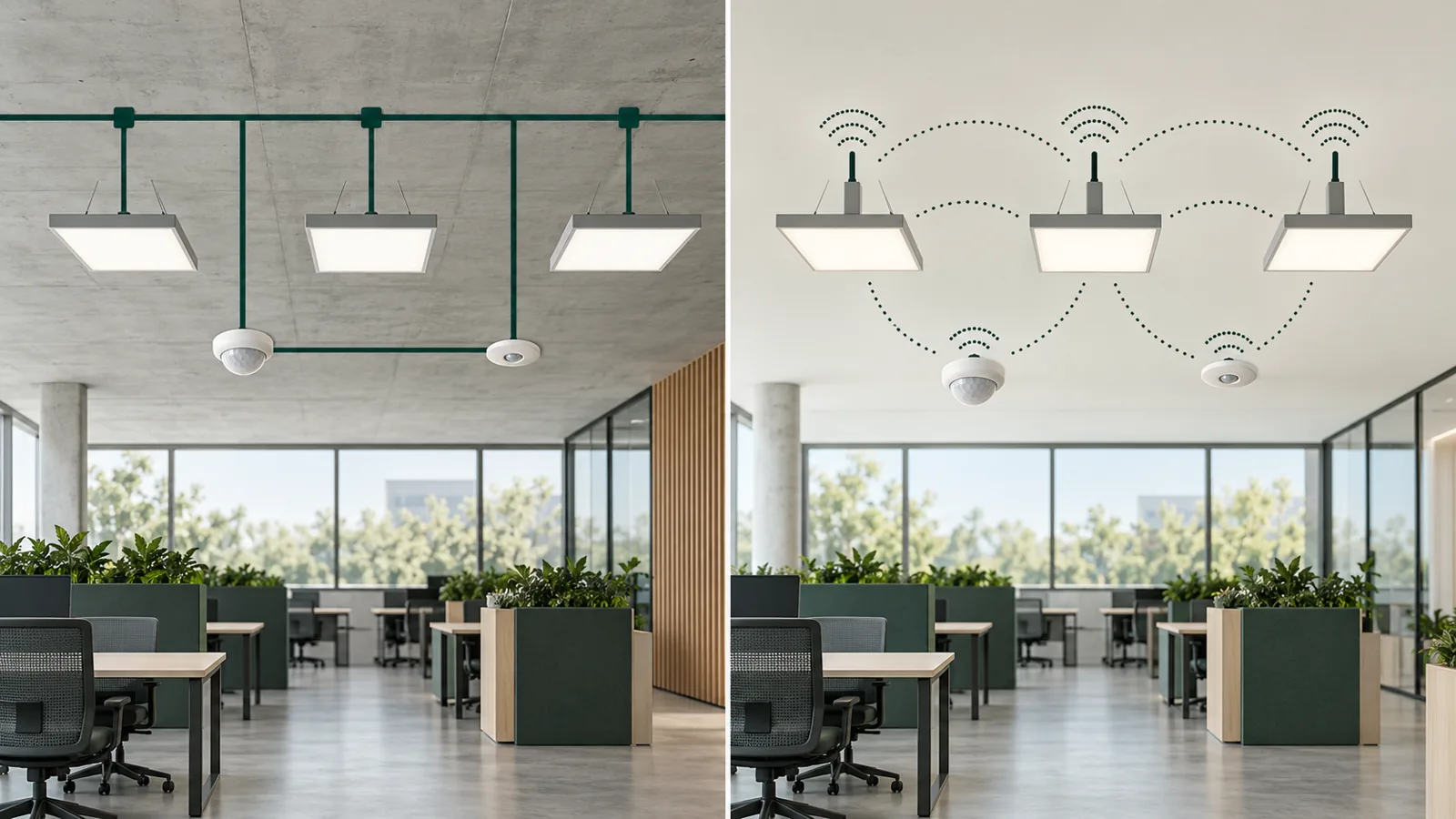
Why does the distinction matter to a fixture buyer? The answer changes which driver, node, bridge and commissioning tools are required. It also changes what can be replaced later. A fixture with a wired DALI-2 driver may be perfectly appropriate in a DALI+ project if a compatible bridge connects a wired subnet. But that does not make the fixture a native wireless DALI+ device. The bill of materials must identify the bridge and its responsibilities.
Decide from the building constraint, not the buzzword
For a new-build office with planned control wiring, wired DALI-2 may be a clear, maintainable solution. For an occupied retrofit where running a new bus is difficult, wireless connectivity may be attractive. A mixed building may need a hybrid architecture. The DALI Alliance’s 2026 Light + Building recap specifically describes retrofit and hybrid wired/wireless scenarios as areas of interest. Interest is not evidence that one architecture is best for every project.
Map the project constraints: accessible ceiling routes, existing wiring, radio conditions, commissioning resources, IT policy, future churn and maintenance capability. Then ask the controls designer to compare at least two plausible architectures. Consider how each one handles outages, device replacement, security, configuration backup and the people who will maintain it. Avoid specifying a transport technology before the operational case is clear.
Ask what exactly is inside the luminaire
A fixture schedule should identify the LED module, driver model, interface, any wireless node, relevant power supply, connector arrangement and accessible service parts. If an OEM supplier offers several driver options under one luminaire family, make the approved variant explicit. “DALI option available” does not say which version, which control gear or whether it has the required functions.
For an LED linear run, check where the driver or node is housed and how it can be replaced without breaking the architectural line. For track systems, check whether the track, adaptor and power arrangement suit the intended control scheme. Product families such as linkable LED linear lights and adjustable LED linear track lights can be evaluated for a project, but their exact control configuration must be agreed rather than inferred from the product-family name.
Ask about dimming performance of the assembled luminaire. A standards-based command path does not guarantee that the chosen LED engine and driver produce a visually smooth low-end result. Test the approved fixture with the actual controller and scenes. For colour-tunable or multi-channel applications, specify the required behaviour and verify every channel, not just overall on/off operation.
Verify certification and interoperability evidence
Certification applies to specific products and functions, not to every product from a manufacturer. Ask for product identifiers and evidence that matches the exact component proposed. The Alliance FAQ states that the DALI-2 logo is for products that have completed its certification process and that certified products are listed in its database. For DALI+, check the programme’s present status and any claims against the Alliance’s current information.
Interoperability is also a system question. Even if individual components have appropriate certificates, the project still needs to test device discovery, addressing, grouping, scene recall and replacement across the chosen ecosystem. Ask the integrator who is responsible when a driver, sensor and controller come from different suppliers. Require an acceptance test with a representative combination rather than relying on a list of compatible-sounding logos.
Check bridging and future expansion explicitly
The DALI Alliance says its Part 104 Changes and Additions specification supports bridges that allow wired DALI-2 devices and luminaires to access a DALI+ network. That is useful for phased refurbishment, but a bridge is a real component with topology, capacity and configuration decisions. Ask what happens if it fails, how its settings are backed up and who can replace it. Make clear whether the wired fixtures retain useful local behaviour during a network interruption.
If a building has several floors or tenants, document where network boundaries sit and who owns each one. Do not assume that adding future devices will be frictionless simply because the architecture is described as “scalable.” Confirm addressing, controller capacity, radio design and the site’s IT/security review. These questions are especially important when a project will be handed to a different facilities team after construction.
Security and data ownership belong in the RFQ
The DALI Alliance says DALI+ uses security layers from its underlying transport, with additional application-layer security features for DALI+ with Thread. That statement does not replace a building-specific security plan. Ask who manages credentials, updates, permissions and network access. Identify whether a cloud service is required for everyday lighting operation or only for optional monitoring. Establish what data is collected and who owns configuration files.
For a traditional wired system, security and access are still relevant at gateways and management interfaces. A system that can be reconfigured remotely needs change control and a recovery process regardless of transport. Put these responsibilities in the project documentation. If the controls vendor expects the customer’s IT team to provide a network service, involve that team before equipment is ordered.
Use a physical mock-up to test the buyer’s assumptions
Build one representative zone using the planned luminaire, driver, sensor, controller and any bridge or wireless component. Test on/off, dimming, scenes, power restoration and a replacement device. Check that the person commissioning the project can identify and rename devices without guesswork. Observe whether the room remains usable when connectivity or a gateway is deliberately interrupted, within the limits of a safe supervised test.
Measure the light where people work and inspect glare. A technically correct controls system cannot rescue poor optics. Conversely, a beautiful luminaire can disappoint if its low-end dimming flickers or jumps. Keep the approved hardware and settings as a golden reference for production and future maintenance. Our commercial LED lighting commissioning checklist helps structure these acceptance steps.
Buyer checklist for a DALI+ or DALI-2 fixture order
- Write the required architecture: wired DALI-2, native DALI+, or a wireless gateway to wired DALI.
- List exact driver, controller, sensor, node and bridge models.
- Check current certification status for each claimed certified device.
- Confirm the control interface, dimming range and low-end visual behaviour of the finished luminaire.
- Define who commissions, backs up, secures and maintains the system.
- Test bridge and outage behaviour where a hybrid topology is proposed.
- Approve a representative sample and keep its settings and hardware list.
- Do not substitute a driver during production without reviewing controls compatibility.
Separate “supported” from “supplied” in a product schedule
A luminaire brochure may list several possible control options, but a purchase order selects one physical build. Ask the supplier to mark whether the chosen driver, wireless node, bridge and power components are included in the quoted fixture, supplied by the integrator or excluded. If a DALI-2 driver is supplied without the proposed DALI+ bridge, the installation is not complete merely because the luminaire is “DALI compatible.” Clarify connection and commissioning responsibilities before the order is placed.
Similarly, a specification that supports a future wireless upgrade does not prove that the route is economical. Confirm mounting space, power availability, access to the fixture, product availability and who would update the configuration. For a pilot project, test a simulated replacement of one driver and one sensor. The resulting time, tools and documentation will reveal more about maintenance effort than a generic promise of flexibility.
When a manufacturer changes a component during production, request a written equivalence review that covers the control interface and functions as well as electrical and optical performance. A substitute may light the room but fail the intended scene or data feature. Freeze the approved sample and the associated bill of materials for the rollout.
Frequently asked questions
Is DALI+ just another name for DALI-2?
No. DALI-2 describes the current wired DALI ecosystem and certification approach; DALI+ carries DALI commands over wireless and/or IP-based networking. They can be connected in a hybrid system but should not be conflated.
Can a wired DALI-2 luminaire be used in a DALI+ project?
Potentially, through an appropriate bridge and project design. That does not turn the luminaire into a native wireless DALI+ product.
Does “DALI+ ready” mean certified?
Not by itself. Ask for the exact device identification and check the DALI Alliance’s current certification information before making a procurement claim.
Is wireless always easier in a retrofit?
No. It may reduce some wiring work, but radio design, IT coordination, commissioning and maintenance still need to be planned and priced.
What is the minimum useful mock-up?
One complete representative zone using the intended fixtures and controls, including any bridge, with tests for scenes, dimming, outage recovery and device replacement.
For an OEM commercial lighting project, send LCB the fixture schedule, intended control architecture and the exact driver or node requirements. We can help define a sample and production-control checklist for the luminaire portion; the controls designer should validate the complete installed system.
